Skip to content

Do Not Forget: Introduction to Reminder Tests in Programming

10 June 2024

Remembering everything that needs to be done during programming is a challenge. The larger the project, the more things and tasks there are to remember. For rare but necessary tasks that are too expensive to automate, programmers have to rely on their memory or - during code reviews - their colleagues' memory, which eventually leads to errors and mistakes. To address this problem, a new type of tests called reminder tests comes into play.

Why Alternatives Do Not Suffice?

Traditional code quality control methods, such as static analysis and code reviews, have their limitations. Static analysis is effective at detecting syntactic and stylistic errors but won't verify whether additional tasks, such as updating documentation, have been completed.

Code reviews are valuable, but human error and time constraints may result in overlooking important details. As a result, rarely performed but crucial actions are easily forgotten, leading to serious issues. Reminder tests fill this gap, serving as the last line of defense against such oversights.

Reminder Tests

Reminder tests are a type of automated test used in programming. Their purpose is to remind programmers to perform rare actions related to code changes. They are similar to static analysis but are used in cases where it's not possible to automatically check whether a specific action has been performed, or when it's too costly. For example, performing something in another tool (like documentation) or making a conscious decision in situations where default behavior might be incorrect (such as specifying access permissions to an API endpoint).

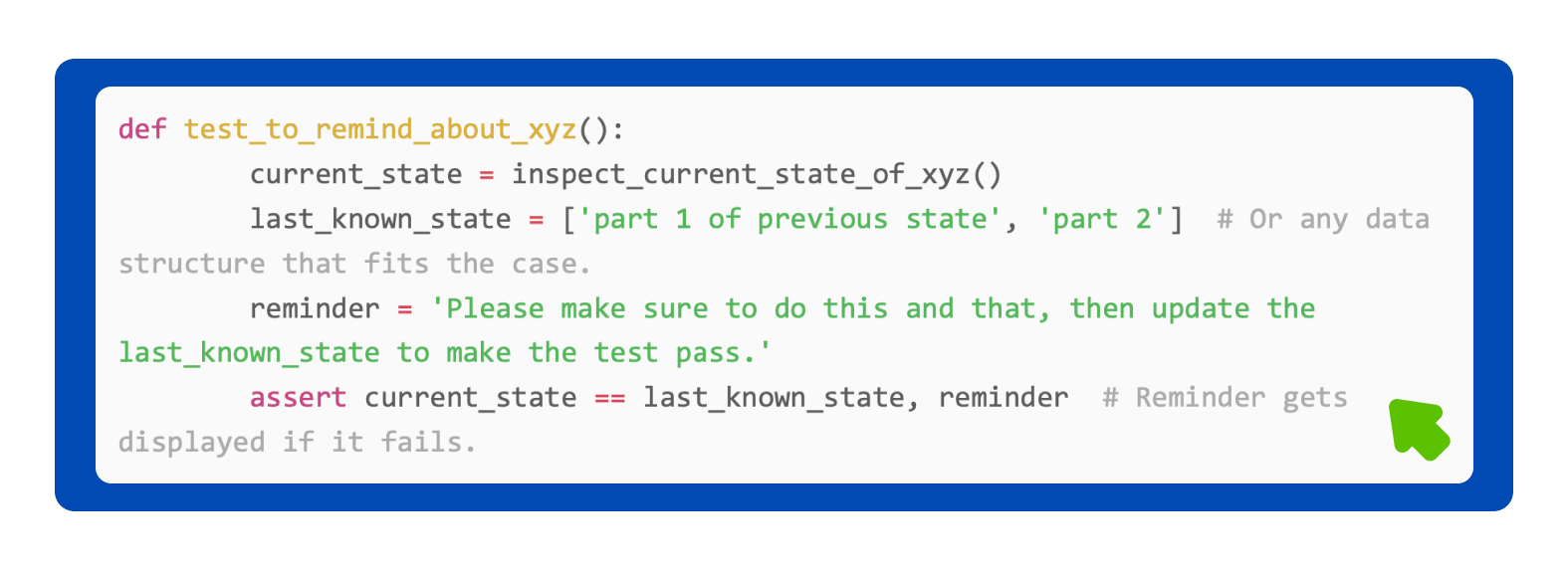
Reminder tests react to changes that can be verified through code inspection. Upon such a change, they fail, providing a human-understandable description of what needs to be done. This forces the programmer to consciously update the test's last known state to pass it. To achieve this, a reminder test stores the last known state of the code within itself and compares it with the current state it calculates.


Implementation

In the code, a reminder test is written similarly to other regression tests at the unit or integration level and is executed alongside them. How a reminder test works:

  1. Analyzes the current state of the code and saves it to a data structure.

  2. Compares it with the last known state, encoded as a data structure within the test.

  3. Checks if they are the same.

  • If yes - the test passes;

  • If not - the test fails, and then a human-readable instruction is presented.

This instruction provides detailed guidance on the required actions and optionally indicates that the last known state of the test should be updated.

The key difference between a reminder test and a regular automated regression test is that in the case of the reminder test's failure, updating its internals—specifically, the last known state—is expected. In other tests, changes are expected in the external code.

Simple Example

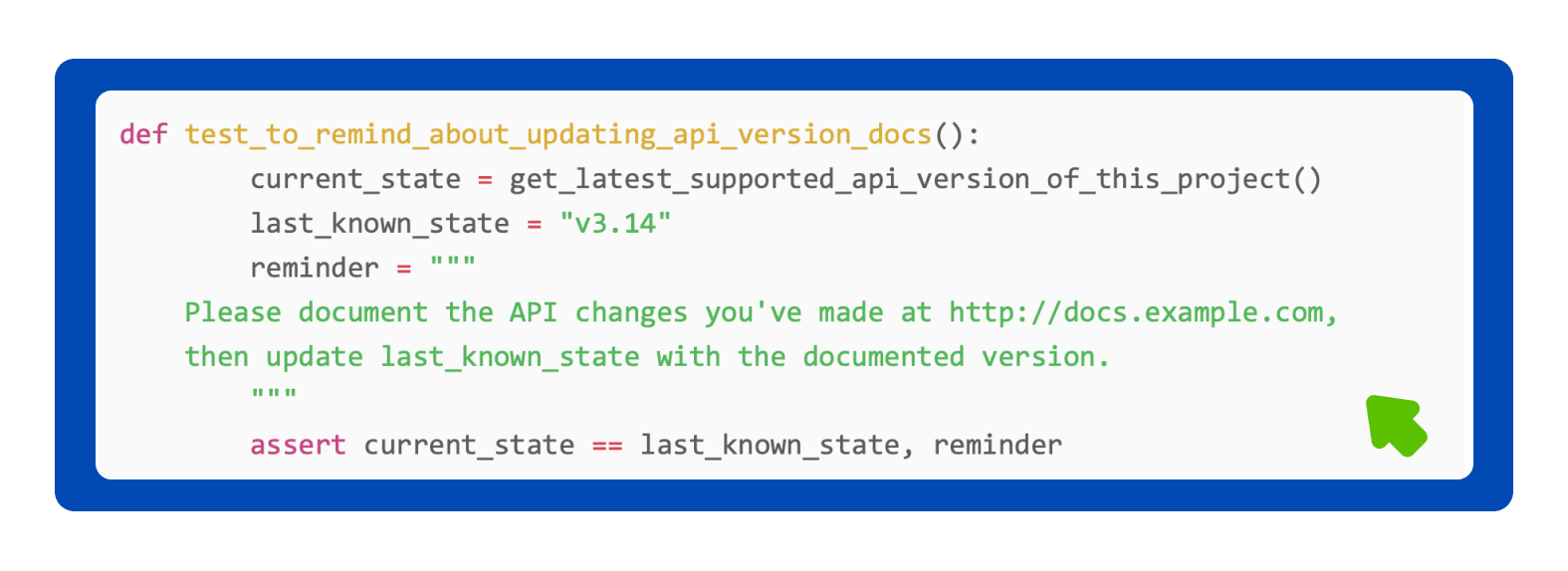
In this example, we want to ensure that all new versions of the project's API are documented in another tool, and adherence to this requirement cannot be automatically verified at low costs.

Complex Example

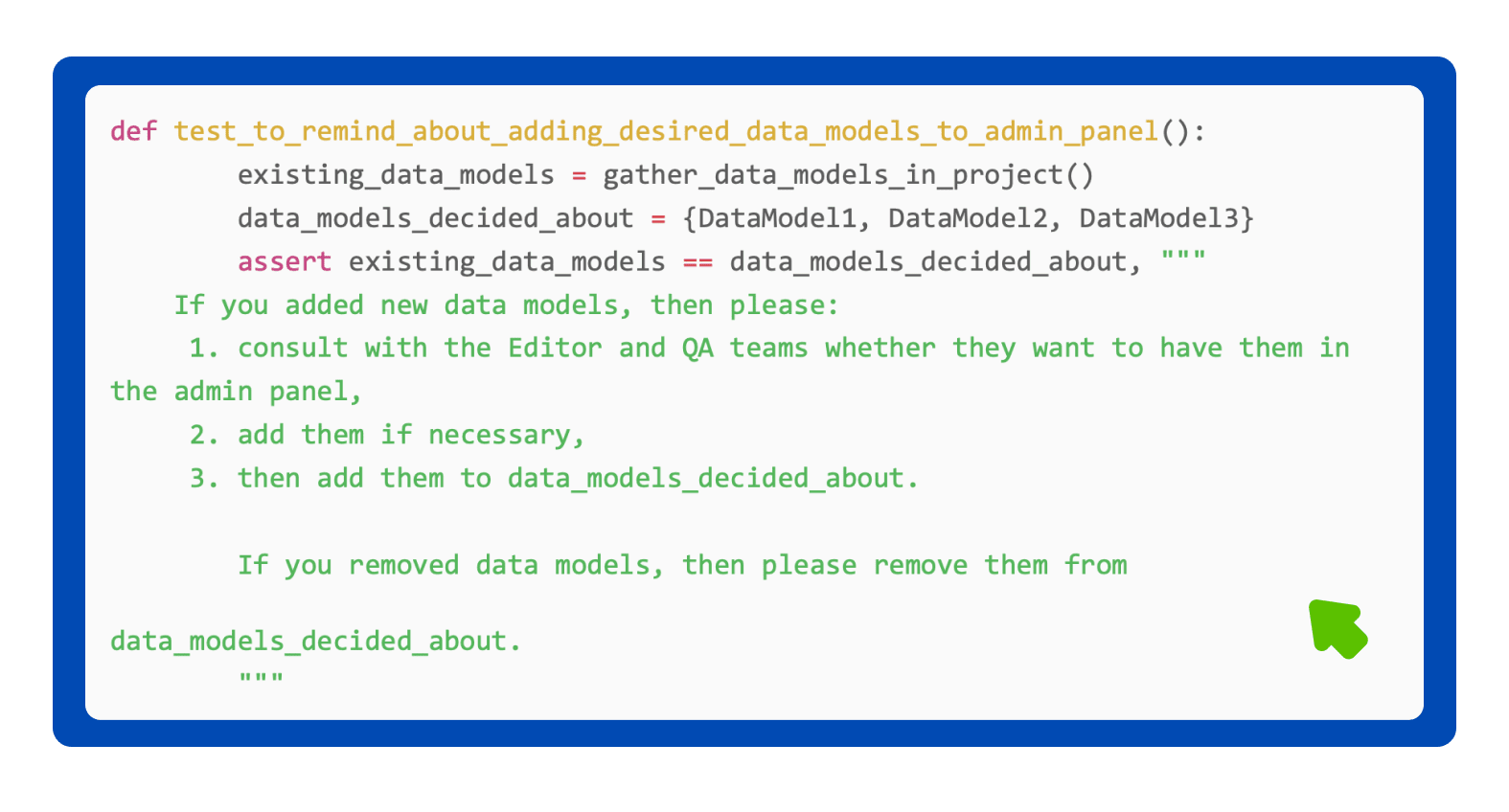
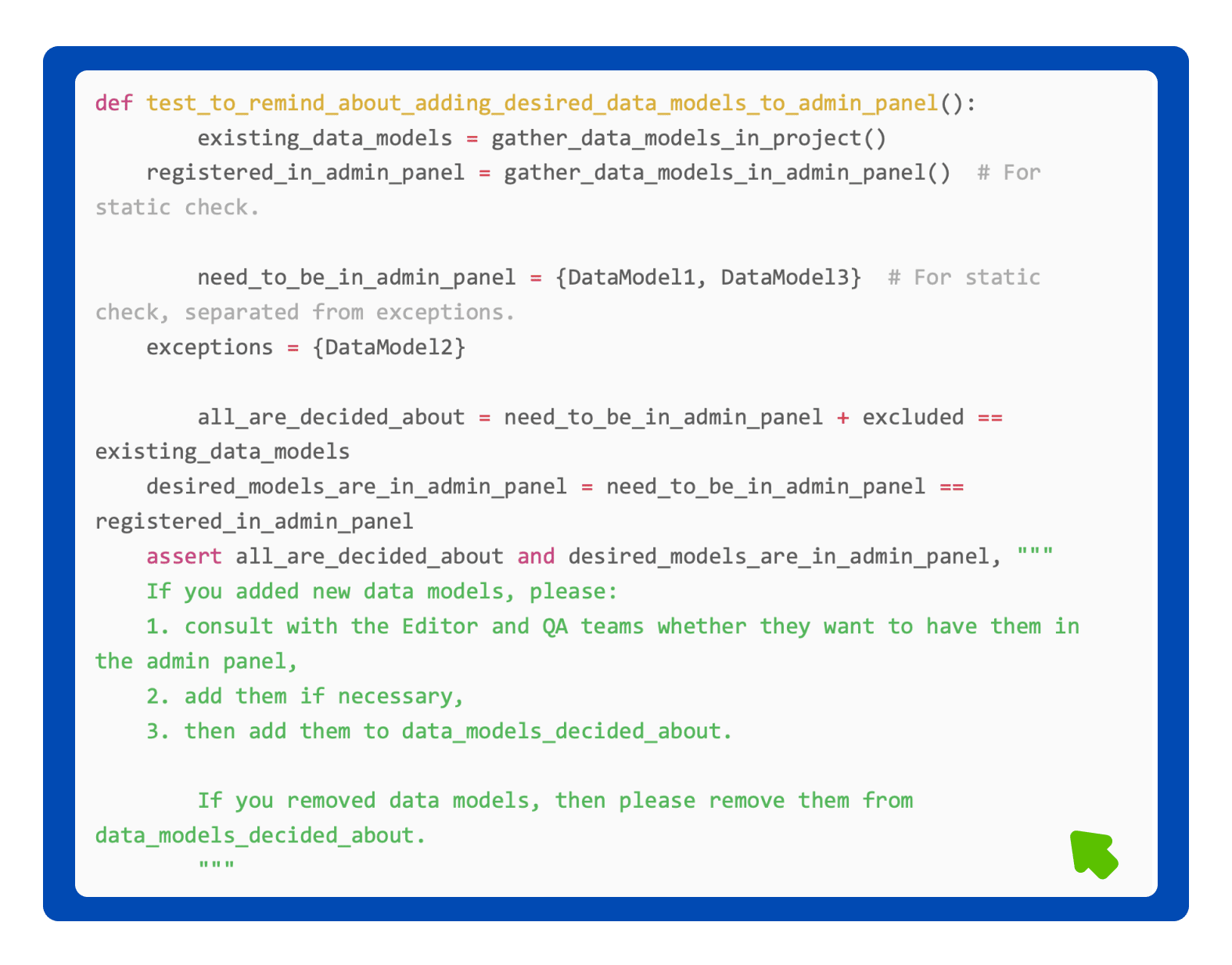
In this example, we want the programmer to consciously decide whether to make new data models available in the administrative panel or not. By default, they are not present there, but it would probably be useful to add them, and it would save time if this were done now.

In this case, you can combine static code analysis with a reminder test:

Alternative Implementations

Reminder tests can also be written as rules of a static code analyzer, provided they can be edited and, ideally, tracked in a version control system.

Another method is placing assertions directly in the code. This solution can be effective in simpler cases, but it's crucial to ensure that assertions fail during the testing phase rather than after deployment in a production environment. If an assertion is within code that is not executed during tests, a warning to take action will come too late, and the assertion will trigger an exception and application error. Therefore, in uncertain situations, it is recommended to place such assertions within simple reminder tests.

Scenarios When They Excel

Example scenarios where reminder tests prove useful:

  • Actions Outside Code:

    • Change in the database schema → has the documentation been updated?

    • New environment variable → has it been set for all environments in the system manager?

    • New API version → have the updates been documented?

    • Addition of an API endpoint → have the monitoring and alerting rules been updated?

    • Changes in sensitive data fields → are they compliant with data protection laws?

    • New third-party library → is the license compatible with the project?

  • Scenarios where decisions need to be made when default behavior may be undesirable, for instance:

    • New database field → should it be anonymized?

    • New data model → should it be added to the administrative panel?

    • Deleting a database table → should a backup be performed?

    • Adding an API endpoint → does it require a separate rule for query frequency restrictions?

Advantages and Disadvantages

Reminder tests, like any tool, have their strengths and weaknesses. Their primary goal is to automate the reminder process for infrequent but crucial tasks, which, in turn, has its unique consequences. Below are the key aspects to consider when deciding to implement them.

Advantages

▪️ Eliminate the need to remember infrequent actions, thereby reducing mental load. ▪️ Force explicit marking of an action as completed. ▪️ Remind only when necessary.

Disadvantages

▪️ Do not verify whether actions have actually been executed. ▪️ Require an initial workload associated with writing tests. ▪️ Run only when tests are executed. Some actions must be performed beforehand.

When to Use Reminder Tests

Given the mentioned pros and cons, it is recommended to use reminder tests when:

  • An action to be performed is associated with code changes, is important, but needed infrequently.

  • There is a risk of developers consciously bypassing necessary actions.

  • Executing the action is possible to check automatically, but it would require significant effort.

On the other hand, it is discouraged to use them when:

  • The action is needed frequently. In such cases, a checklist may be a better solution to avoid the need for frequent test updates.

  • Exceptions occur too often where nothing needs to be done. In such situations, developers may start updating the test status without considering the reminder content.

  • The action requires waiting - for example, input from a separate team. If tests are run only after code submission, such late reminders may block deployment. In such cases, consider adding it to a checklist or task template to parallelize with programming.

  • A similar cost could be incurred by writing static analysis, which does not require updates after performing the action. In these cases, extending static analysis might save time in the long run.

Summary

To sum up, reminder tests fill a significant gap in code quality management. Designed to remind about infrequent but necessary tasks, they function as an excellent safety net. Coined and introduced by the author of this article, these tests are still in the exploratory phase, and additional materials about them are currently lacking.

Nevertheless, their potential application is immense. Integrating reminder tests into daily programming practices can streamline code management and enhance its quality. Therefore, it is definitely worth considering their implementation as another innovative element in the arsenal of programming tools.

Jan Chęć

Backend Software Engineer and Guild Lead

Are you ready to make a difference?

Take the next step in your career journey with a company that values growth and development. Check our current openings and join a team at the forefront of digital health development!